
Find out the simple steps to refresh your quota-based commission setup before next year.
There are three types of Commission Plan Matrices you can use to determine the commission rate to be paid to each of your salespeople.
Two of those matrices, the Standard Matrix and the Tiers Matrix, require no action from you year to year.
But one matrix, the Quotas Matrix, calculates commissions based on set periods. That means it requires an update from you at the end of each year.
Fortunately, you don’t have to wait until December 31 to do this — you can take care of it right now. And once you take care of it, you can cross that task off your list and rest easy knowing you’re prepared to make next year’s quota-based commission processing a breeze.
How the Quotas Matrix Works
The Quotas Matrix evaluates a salesperson’s performance against the quota periods you define. The matrix then determines the commission percentage or amount, based on the level achieved within that period.
For example, you could pay your salesperson, Lisa, a base commission of 2% to meet a standard sales goal in Q2, and use quotas to motivate her to sell more by offering a 3% commission if she reaches a stretch goal during that same quarter.
Why You Need to Update Your Quotas Matrix Each Year
Setting up quota-based commission options is a smart business tactic, and they’re easy to set up in your Commission Plan software.However, a quota period defined for 2025 can’t be reused for 2026 because each fiscal year must have a new set of quota periods configured.
Therefore, at the end of each year, you will need to create the quota periods for each new fiscal year you plan to process commissions for (which may or may not align with a calendar year).
You have virtually unlimited flexibility with this. You can set up quotas as:
- Annual
- Quarter
- Month
- Semiannual
- User-defined
Really, the sky is your limit.
How to Set Up Quota Periods
Please refer to the “Quota Periods Setup” section of your User Manual for more details.
Set up quota periods for next year using the Commission Plan Quota Periods Setup window.
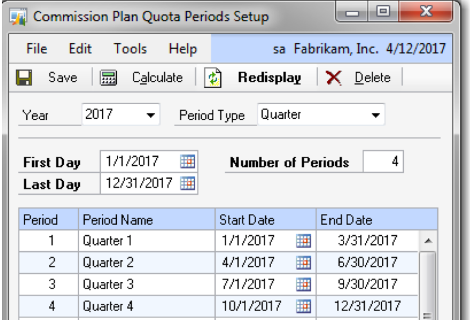
This window allows you to create up to 5 quota period setups per year, one for each of the quota period options (Annual, Quarter, etc.)
- Choosing a year
If you choose a year, the first day and last day will be defaulted from your GP fiscal year (which is not necessarily a calendar year). You can override these dates.
- Choosing a preset period type
If you choose an Annual, Semiannual, Quarter, or Month period type, your number of periods will be defaulted based on your selection. Again, you can override these.
- Choosing a user-defined period
If you choose a user-defined period, it’ll be up to you to enter the number of periods you want.
Once you’re satisfied with the first day, last day, and number of periods for your chosen quota period, click the Calculate button to create the periods.
Congrats — you’re done!
Making Quota-Based Commission Calculation Changes Later in the Year
Don’t worry. Nothing is set in stone here (unless you want it to be). You can always modify or delete a period if you’d like, as long as it hasn’t been assigned to a plan combination yet. (However, it’s important to keep in mind that once Commission Plan processes commissions using a quota period, that period can’t be changed without recalculating those posted transactions.)
Set It Up Now, or Get Help from the EthoTech Team
Remember, you don’t have to wait until December 31 (or the end of your fiscal year) to take care of this; you can do it right now.
We’ve worked hard to make it an easy, intuitive process for our users, and you’ve probably done it before. Therefore, it shouldn’t cause you any stress.
However, if you run into any issues or have any questions, you know the EthoTech team is always here to help.
Contact EthoTech If You Have Questions
Since 2002, companies across every sector have relied on EthoTech for the right tool for tracking, calculating, and paying variable compensation. We provide solutions, integration, and support that is focused solely on integrated variable compensation software for Microsoft Dynamics GP, and we are committed to helping you gain value from GP well beyond its lifecycle. Commission planning for GP is all we do, and we do it better than anyone. Contact EthoTech to learn more.